
Hello,
I wanted to know what type of file does the BD software accept for
Dolby Atmos.
Thank you
All the best
Dolby Atmos
-
Alexey Kolesnikov
- Posts: 721
- Joined: Fri Mar 01, 2013 1:03 pm
-
KEYFRAME
- Posts: 15
- Joined: Fri Jul 24, 2020 7:11 am
Re: Dolby Atmos
Thanks for your answer.
I am waiting for my client to provide me with these files, but before doing the different tests and seeing that everything works correctly, I have a question about these instructions:
I have to include both the .mpl and .ac3 files. Are they each on a track? That is, the .mpl in Audio 1 and .ac3 in Audio2 for example. Is it so?
and on the other hand in the help of the software they tell me that :"
Where do I mark this? I can't find where it is
Thank you very much
All the best
I am waiting for my client to provide me with these files, but before doing the different tests and seeing that everything works correctly, I have a question about these instructions:
I have to include both the .mpl and .ac3 files. Are they each on a track? That is, the .mpl in Audio 1 and .ac3 in Audio2 for example. Is it so?
and on the other hand in the help of the software they tell me that :"
Where do I mark this? I can't find where it is
Thank you very much
All the best
-
Alexey Kolesnikov
- Posts: 721
- Joined: Fri Mar 01, 2013 1:03 pm
Re: Dolby Atmos
You should specify .mlp file only. The .ac3 file should have the same name and be located next to the .mlp
For example: C:\Project\audio.mlp and C:\Project\audio.ac3
For example: C:\Project\audio.mlp and C:\Project\audio.ac3
Best regards,
Alexey Kolesnikov
Alexey Kolesnikov
-
KEYFRAME
- Posts: 15
- Joined: Fri Jul 24, 2020 7:11 am
Re: Dolby Atmos
It is understood.
Thank you very much
Thank you very much
-
Qin Lun
- Posts: 3
- Joined: Wed Apr 20, 2022 4:17 pm
Re: Dolby Atmos
Code one copy respectively * AC3 and * MLP ,BDS/Kite import MLP will be synthesized into TrueHD with core
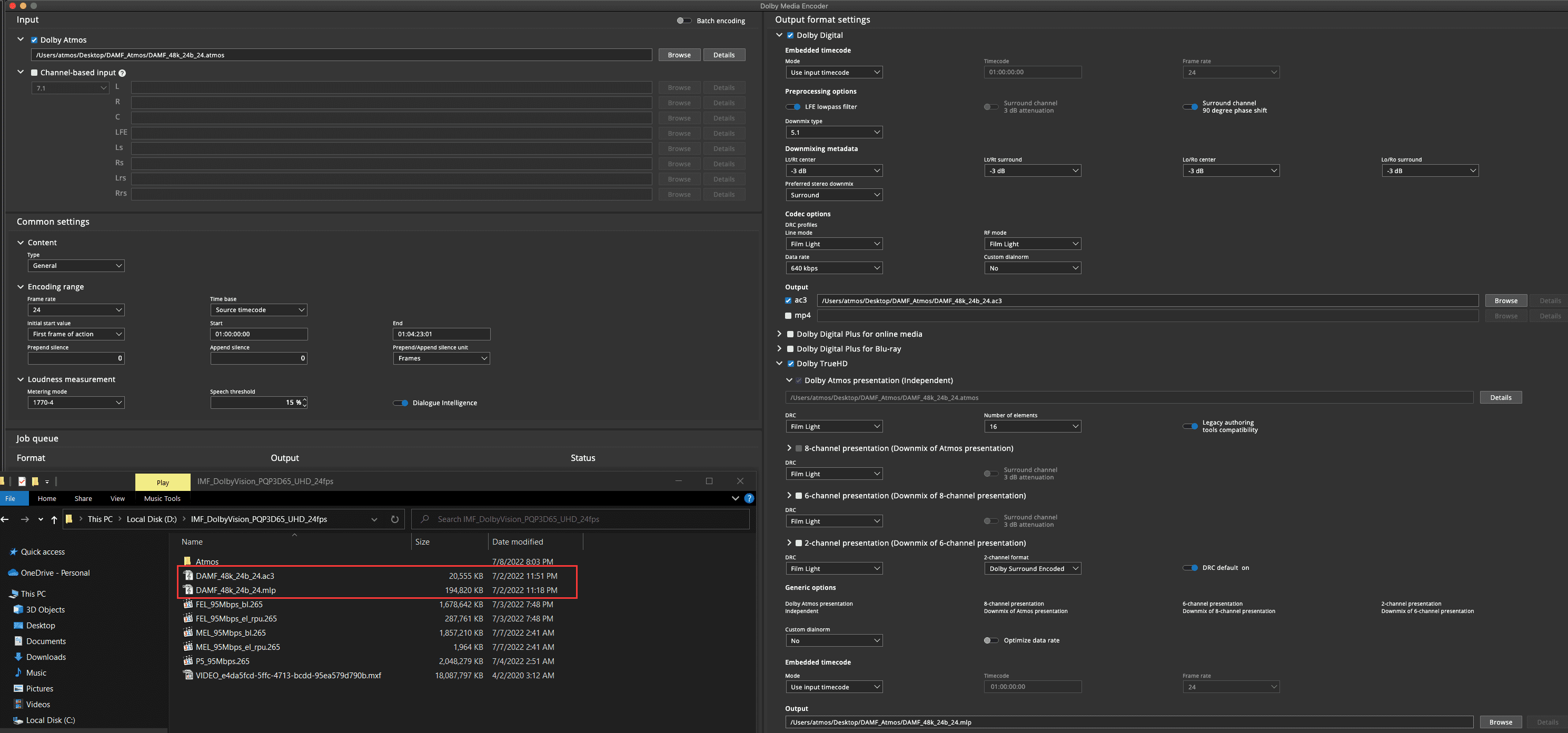
ps:The file should have the same name and be next to it
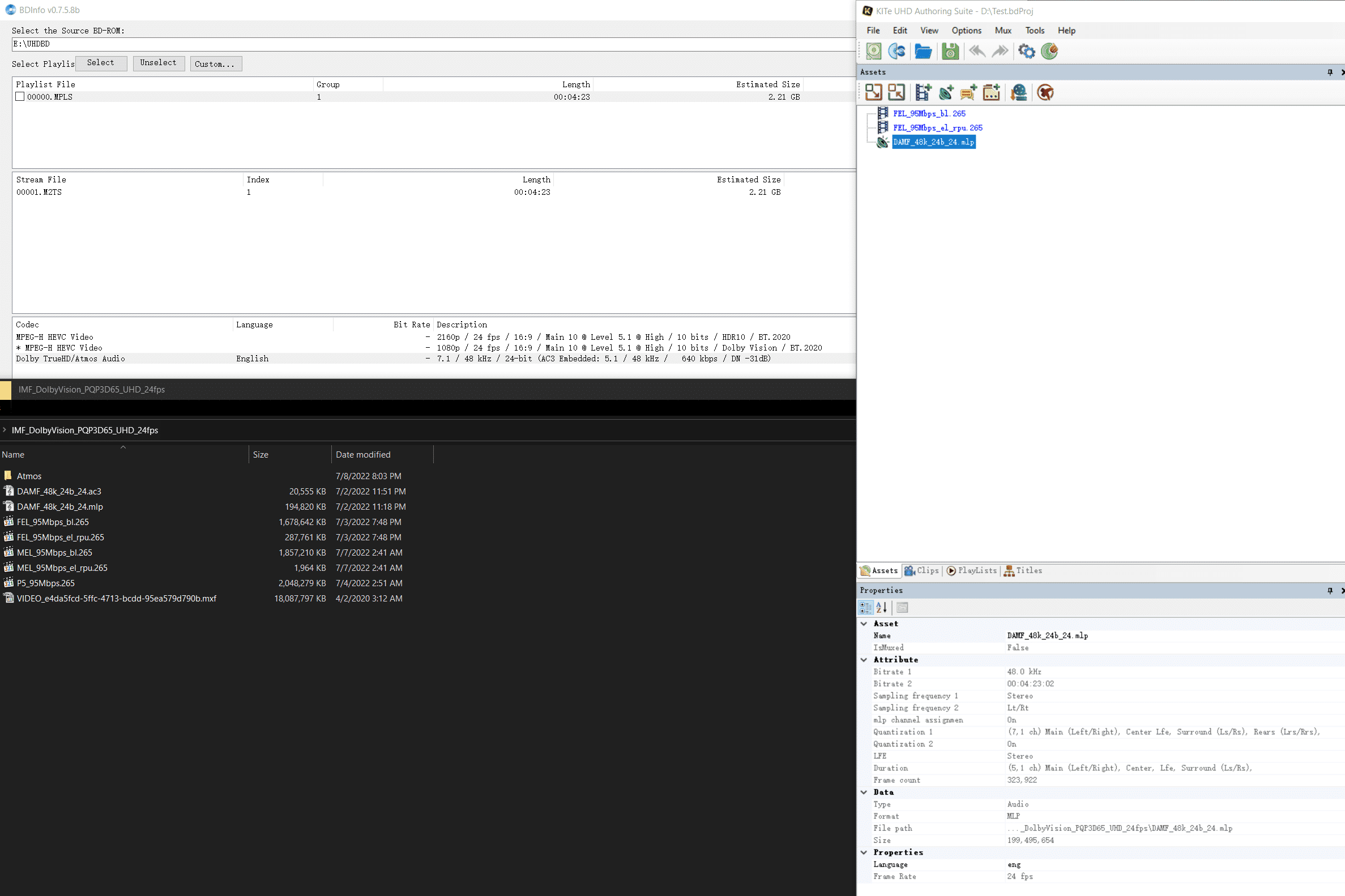
The above may help you
ps:The file should have the same name and be next to it
The above may help you
-
KEYFRAME
- Posts: 15
- Joined: Fri Jul 24, 2020 7:11 am
Re: Dolby Atmos
Thank you very much!
Your instructions have been very helpful.
Your instructions have been very helpful.
-
AlanBell1975
- Posts: 51
- Joined: Wed Aug 09, 2023 2:56 pm
Re: Dolby Atmos
Hi Alexey,
A client has given me an mlp and an ac3 for an Atmos 7.1 disc. As discussed in the thread, both files have the same name, and sit next to each other in the folder structure. However, when I play the Atmos track on a Dolby Digital set-up (5.1), I only hear the L, R and LFE speakers. I would have expected to hear it in full 5.1.
I tested other Atmos discs, and feature films do the same, no audio in the C, Ls, or Rs speakers. Whereas Blu-ray Audio discs do feature audio in all the 5.1 speakers.
I appreciate this probably has nothing to do with Blu-Disc studio, I'm just looking for clarity.
Regards,
Alan.
A client has given me an mlp and an ac3 for an Atmos 7.1 disc. As discussed in the thread, both files have the same name, and sit next to each other in the folder structure. However, when I play the Atmos track on a Dolby Digital set-up (5.1), I only hear the L, R and LFE speakers. I would have expected to hear it in full 5.1.
I tested other Atmos discs, and feature films do the same, no audio in the C, Ls, or Rs speakers. Whereas Blu-ray Audio discs do feature audio in all the 5.1 speakers.
I appreciate this probably has nothing to do with Blu-Disc studio, I'm just looking for clarity.
Regards,
Alan.
-
Alexey Kolesnikov
- Posts: 721
- Joined: Fri Mar 01, 2013 1:03 pm
Re: Dolby Atmos
Hi Alan,
I guess something with your speaker setup. If your hardware does not support Atmos - it should play the AC3 core.
I guess something with your speaker setup. If your hardware does not support Atmos - it should play the AC3 core.
Best regards,
Alexey Kolesnikov
Alexey Kolesnikov
-
AlanBell1975
- Posts: 51
- Joined: Wed Aug 09, 2023 2:56 pm
Re: Dolby Atmos
Hi Alexey,
Following on from my previous post: I have an mlp and ac3 that were created in Dolby Media Encoder; these files have the same name. Just a couple of questions:
1. Is there anything I need to do in BDS to prepare these files prior to muxing, or will the software accept them automatically? (I am using the internal muxer).
2. As well as having Dolby Atmos, my disc also offers Dolby Digital 5.1 as an option. Can I use the same ac3 as sits with the mlp, or would you advise using a separate file (or at least the same file renamed)?
Finally on a separate issue. When building a CMF with region ABC, would you select 'All' or 'None' on the BD Regions drop-down.
Many thanks.
Following on from my previous post: I have an mlp and ac3 that were created in Dolby Media Encoder; these files have the same name. Just a couple of questions:
1. Is there anything I need to do in BDS to prepare these files prior to muxing, or will the software accept them automatically? (I am using the internal muxer).
2. As well as having Dolby Atmos, my disc also offers Dolby Digital 5.1 as an option. Can I use the same ac3 as sits with the mlp, or would you advise using a separate file (or at least the same file renamed)?
Finally on a separate issue. When building a CMF with region ABC, would you select 'All' or 'None' on the BD Regions drop-down.
Many thanks.